


427 字
2 分钟
docker阿里云镜像加速

docker阿里云镜像加速
步骤
1.登录 阿里云网站
2.注册阿里云账户
3.获取加速器地址连接
4.配置本地docker进行镜像加速器
针对Docker客户端版本大于 1.10.0 的用户 您可以通过修改daemon配置文件/etc/docker/daemon.json来使用加速器
[root@laptop ~]$ docker -vDocker version 19.03.4, build 9013bf583a
[root@laptop ~]$ mkdir -p /etc/docker[root@laptop ~]$ tee /etc/docker/daemon.json <<-'EOF'{ "registry-mirrors": ["https://1664le6h.mirror.aliyuncs.com"]}EOF5.重启docker后台程序
[root@laptop ~]$ systemctl daemon-reload[root@laptop ~]$ systemctl restart docker6.测试
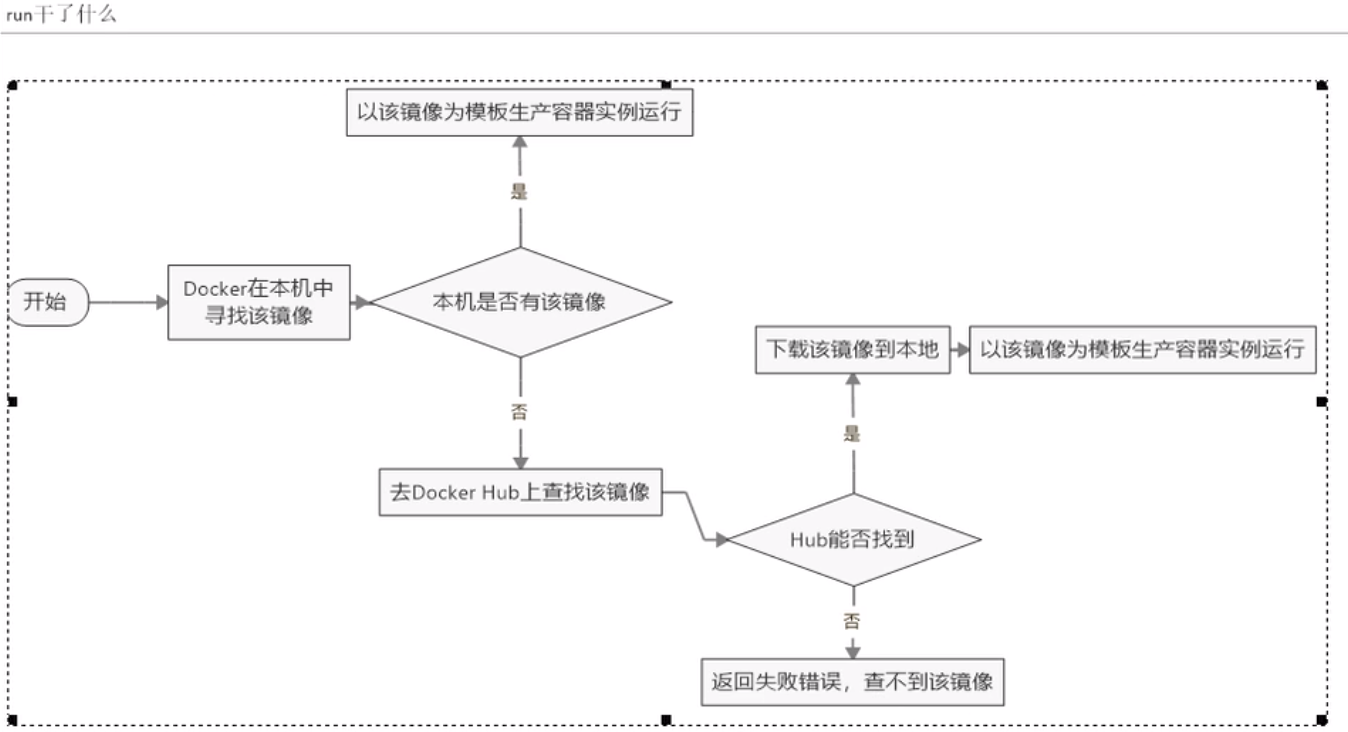
[root@laptop ~]# docker infoClient:Debug Mode: falseServer:Containers: 1 Running: 0 Paused: 0 Stopped: 1Images: 1Server Version: 19.03.4Storage Driver: overlay2 Backing Filesystem: extfs Supports d_type: true Native Overlay Diff: trueLogging Driver: json-fileCgroup Driver: cgroupfsPlugins: Volume: local Network: bridge host ipvlan macvlan null overlay Log: awslogs fluentd gcplogs gelf journald json-file local logentries splunk syslogSwarm: inactiveRuntimes: runcDefault Runtime: runcInit Binary: docker-initcontainerd version: b34a5c8af56e510852c35414db4c1f4fa6172339runc version: 3e425f80a8c931f88e6d94a8c831b9d5aa481657init version: fec3683Security Options: seccomp Profile: defaultKernel Version: 4.20.14-200.fc29.x86_64Operating System: Fedora 29 (Workstation Edition)OSType: linuxArchitecture: x86_64CPUs: 8Total Memory: 7.554GiBName: laptopID: 74Y4:EFIV:S63Y:USTO:V3TB:RU3J:MLXS:6WRK:RHCR:RNTB:LUX3:JGHMDocker Root Dir: /var/lib/dockerDebug Mode: falseRegistry: https://index.docker.io/v1/Labels:Experimental: falseInsecure Registries: 127.0.0.0/8Registry Mirrors: https://1664le6h.mirror.aliyuncs.com/Live Restore Enabled: false[root@laptop ~]# docker run hello-worldUnable to find image 'hello-world:latest' locallylatest: Pulling from library/hello-world1b930d010525: Pull completeDigest: sha256:c3b4ada4687bbaa170745b3e4dd8ac3f194ca95b2d0518b417fb47e5879d9b5fStatus: Downloaded newer image for hello-world:latestHello from Docker!This message shows that your installation appears to be working correctly.To generate this message, Docker took the following steps:1. The Docker client contacted the Docker daemon.2. The Docker daemon pulled the "hello-world" image from the Docker Hub.(amd64)3. The Docker daemon created a new container from that image which runs theexecutable that produces the output you are currently reading.4. The Docker daemon streamed that output to the Docker client, which sent itto your terminal.To try something more ambitious, you can run an Ubuntu container with:$ docker run -it ubuntu bashShare images, automate workflows, and more with a free Docker ID:https://hub.docker.com/For more examples and ideas, visit:https://docs.docker.com/get-started/docker run 逻辑
相关阅读
本主题其他内容
Go 学习笔记与生态实践
本主题共 111 篇 ·
Go 语言 专题 →
Go 生态学习笔记:对优质技术文章的精读与延伸验证、Go 数据分析实战、Docker 与 Go 结合的开发流程,以及日常学习中整理的可复用代码片段与经验总结。